
 Have you ever felt that your Windows applications look a little boring and are missing that touch of visual style and creativity? I assume you have, so I’m going to show you how you can paint a gradient background for your Windows Forms. It might not sound like much but this goes a long way in making your interface more appealing to the end users of your application.
The .NET framework includes a class called System.Drawing.Drawing2D.LinearGradientBrush which is designed specifically for painting gradients. It accepts as parameters the coordinates of the object to paint, the two colours used to produce the gradient, and the angle of the gradient.
Now, let’s use this class to paint a gradient on our Windows Form.
We begin by overriding the form’s OnPaintBackground method like this:
protected override void OnPaintBackground(PaintEventArgs e)
{
}
This method will fire when the form is to be painted so it is the perfect event for us to paint our gradient in. Now that we have overridden the OnPaintBackground method we must create an instance of LinearGradientBrush and give it some parameters for our gradient. We must also paint the form using the Graphics‘ object FillRectangle method. The code for this is below:
protected override void OnPaintBackground(PaintEventArgs e)
{
    using (LinearGradientBrush brush = new LinearGradientBrush(this.ClientRectangle,
                                                               Color.Gray,
                                                               Color.Black,
                                                               90F))
    {
        e.Graphics.FillRectangle(brush, this.ClientRectangle);
    }
}
 When creating a website you will always have common sections which are repeated on every page throughout your whole site. For example headers and footers, a navigation bar, a side bar, etc. are all sections in your site which do not change depending on which page is being browsed. With a Master Page you only need to create these common sections once – ASP.NET will handle the rendering of them on every page automatically. This is a great advantage because you don’t have to copy identical code to every single page of your website.
 When performing a relatively heavy operation on your Windows Form, what often happens is that your application’s UI will freeze until the heavy operation completes. This is usually unacceptable because your application’s end user will think it crashed and probably try to close it. To solve this problem you need to run your heavy operation on a separate thread from that of your UI. This way you will be able to run your operation while also keep the end user informed of the progress from the UI. In this article I will show you how to do just that.
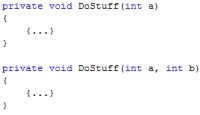 Sometimes when programming, you might want to create a number of methods which internally have similar logic but accept different parameters. For example, an addition method called
  If you are a programmer, or work in front of a pc all day, and have been doing it for a while, I’m sure you’ve either experienced RSI yourself, or else you know someone who has. RSI, or Repetitive Strain Injury, is not something to be taken lightly as it can become quite serious if nothing is done to prevent it from worsening. Trust me, I should know since I came quite close to serious RSI.
 It all started with a tingling sensation in my index and middle fingers on both hands. Although the strange thing was that this tingling occurred while I was driving and at night while sleeping. At first it never occurred when I was in front of the pc, which led me to believe it was not RSI.