
 In this two-part article series I am going to show you how to implement a simple client-server chat application using asynchronous UDP sockets. In this first article of the series I will be focusing on the server of our chat application. The client will be discussed in part two.
What is UDP?
UDP, or User Datagram Protocol, is a connectionless protocol that runs on top of IP networks. UDP does not have an inbuilt mechanism to make sure that all the data being sent is received and received in order – instead such logic must be implemented in the application using the protocol.
UDP is typically used for streaming data such as video or audio, it is also used in VoIP, online gaming, and for broadcasting data over a network.
Application Infrastructure
The infrastructure we are going to use for this chat application is a simple client-server infrastructure as can be seen below:
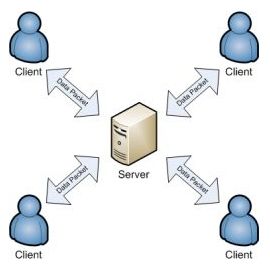
The server will be the central point which all clients connect to, and the communication between server and clients will be done using a custom data packet which will contain the data being sent over UDP.
The Custom Communication Data Packet
For the server and the client to understand the data they receive from each other, they must communicate using a common data structure – or data packet. This data packet is nothing complicated – it’s just a bunch of data formatted into a structure which can be read and understood by the receiver.
In this example, our data packet must contain the name of the client connecting, the message sent by the client, the length of the name and the length of the message, and finally a field which we’ll call the data identifier, which will tell the client or the server what the received data contains. Below is a diagram which visually explains what the data packet will look like:

So every time the client and server communicate they do so by sending this data packet over UDP. For example when a client wants to connect to the server it sends a packet with the Data Identifier set to LogIn, the Name set to the user’s name, the Name Length set to the length in bytes of the user’s name, the Message set to null and the Message Length set to 0.
The Packet Class
So now that we know what the custom communication data packet is, we can implement it. Let’s create a class called Packet as shown below:
using System;
using System.Collections.Generic;
using System.Text;

namespace ChatApplication
{
    // ----------------
    // Packet Structure
    // ----------------

    // Description   -> |dataIdentifier|name length|message length|    name   |    message   |
    // Size in bytes -> |       4      |     4     |       4      |name length|message length|

    public enum DataIdentifier
    {
        Message,
        LogIn,
        LogOut,
        Null
    }

    public class Packet
    {
        #region Private Members
        private DataIdentifier dataIdentifier;
        private string name;
        private string message;
        #endregion

        #region Public Properties
        public DataIdentifier ChatDataIdentifier
        {
            get { return dataIdentifier; }
            set { dataIdentifier = value; }
        }

        public string ChatName
        {
            get { return name; }
            set { name = value; }
        }

        public string ChatMessage
        {
            get { return message; }
            set { message = value; }
        }
        #endregion

        #region Methods

        // Default Constructor
        public Packet()
        {
            this.dataIdentifier = DataIdentifier.Null;
            this.message = null;
            this.name = null;
        }

        public Packet(byte[] dataStream)
        {
            // Read the data identifier from the beginning of the stream (4 bytes)
            this.dataIdentifier = (DataIdentifier)BitConverter.ToInt32(dataStream, 0);

            // Read the length of the name (4 bytes)
            int nameLength = BitConverter.ToInt32(dataStream, 4);

            // Read the length of the message (4 bytes)
            int msgLength = BitConverter.ToInt32(dataStream, 8);

            // Read the name field
            if (nameLength > 0)
                this.name = Encoding.UTF8.GetString(dataStream, 12, nameLength);
            else
                this.name = null;

            // Read the message field
            if (msgLength > 0)
                this.message = Encoding.UTF8.GetString(dataStream, 12 + nameLength, msgLength);
            else
                this.message = null;
        }

        // Converts the packet into a byte array for sending/receiving
        public byte[] GetDataStream()
        {
            List dataStream = new List();

            // Add the dataIdentifier
            dataStream.AddRange(BitConverter.GetBytes((int)this.dataIdentifier));

            // Add the name length
            if (this.name != null)
                dataStream.AddRange(BitConverter.GetBytes(this.name.Length));
            else
                dataStream.AddRange(BitConverter.GetBytes(0));

            // Add the message length
            if (this.message != null)
                dataStream.AddRange(BitConverter.GetBytes(this.message.Length));
            else
                dataStream.AddRange(BitConverter.GetBytes(0));

            // Add the name
            if (this.name != null)
                dataStream.AddRange(Encoding.UTF8.GetBytes(this.name));

            // Add the message
            if (this.message != null)
                dataStream.AddRange(Encoding.UTF8.GetBytes(this.message));

            return dataStream.ToArray();
        }

        #endregion
    }
}
This class, when instantiated, will contain a packet of data in a structured format, which will either be received by the server or sent by the server. The class is quite straightforward – it contains properties for accessing each private field, a constructor for populating the fields, an enumeration which defines the Data Identifier – either Message, LogIn, LogOut, or Null, and a method called GetDataStream which returns the packet as a byte array.
The Server
The job of the server is to allow clients to connect to it and then broadcast each message sent by the client. This means that every message a client sends will be received by all other connected clients. This chat application is like a chat room where everyone chats together. It does not support one to one chat.
When the server starts up it will automatically start listening for incoming connections on port 30,000. The code for starting up the server is below:
private void Server_Load(object sender, EventArgs e)
{
    try
    {
        // Initialise the ArrayList of connected clients
        this.clientList = new ArrayList();

        // Initialise the delegate which updates the status
        this.updateStatusDelegate = new UpdateStatusDelegate(this.UpdateStatus);

        // Initialise the socket
        serverSocket = new Socket(AddressFamily.InterNetwork, SocketType.Dgram, ProtocolType.Udp);

        // Initialise the IPEndPoint for the server and listen on port 30000
        IPEndPoint server = new IPEndPoint(IPAddress.Any, 30000);

        // Associate the socket with this IP address and port
        serverSocket.Bind(server);

        // Initialise the IPEndPoint for the clients
        IPEndPoint clients = new IPEndPoint(IPAddress.Any, 0);

        // Initialise the EndPoint for the clients
        EndPoint epSender = (EndPoint)clients;

        // Start listening for incoming data
        serverSocket.BeginReceiveFrom(this.dataStream, 0, this.dataStream.Length, SocketFlags.None, ref epSender, new AsyncCallback(ReceiveData), epSender);

        lblStatus.Text = "Listening";
    }
    catch (Exception ex)
    {
        lblStatus.Text = "Error";
        MessageBox.Show("Load Error: " + ex.Message, "UDP Server", MessageBoxButtons.OK, MessageBoxIcon.Error);
    }
}
Once the server picks up an incoming request, it will asynchronously call the ReceiveData method below:
private void ReceiveData(IAsyncResult asyncResult)
{
    try
    {
        byte[] data;

        // Initialise a packet object to store the received data
        Packet receivedData = new Packet(this.dataStream);

        // Initialise a packet object to store the data to be sent
        Packet sendData = new Packet();

        // Initialise the IPEndPoint for the clients
        IPEndPoint clients = new IPEndPoint(IPAddress.Any, 0);

        // Initialise the EndPoint for the clients
        EndPoint epSender = (EndPoint)clients;

        // Receive all data
        serverSocket.EndReceiveFrom(asyncResult, ref epSender);

        // Start populating the packet to be sent
        sendData.ChatDataIdentifier = receivedData.ChatDataIdentifier;
        sendData.ChatName = receivedData.ChatName;

        switch (receivedData.ChatDataIdentifier)
        {
            case DataIdentifier.Message:
                sendData.ChatMessage = string.Format("{0}: {1}", receivedData.ChatName, receivedData.ChatMessage);
                break;

            case DataIdentifier.LogIn:
                // Populate client object
                Client client = new Client();
                client.endPoint = epSender;
                client.name = receivedData.ChatName;

                // Add client to list
                this.clientList.Add(client);

                sendData.ChatMessage = string.Format("-- {0} is online --", receivedData.ChatName);
                break;

            case DataIdentifier.LogOut:
                // Remove current client from list
                foreach (Client c in this.clientList)
                {
                    if (c.endPoint.Equals(epSender))
                    {
                        this.clientList.Remove(c);
                        break;
                    }
                }

                sendData.ChatMessage = string.Format("-- {0} has gone offline --", receivedData.ChatName);
                break;
        }

        // Get packet as byte array
        data = sendData.GetDataStream();

        foreach (Client client in this.clientList)
        {
            if (client.endPoint != epSender || sendData.ChatDataIdentifier != DataIdentifier.LogIn)
            {
                // Broadcast to all logged on users
                serverSocket.BeginSendTo(data, 0, data.Length, SocketFlags.None, client.endPoint, new AsyncCallback(this.SendData), client.endPoint);
            }
        }

        // Listen for more connections again...
        serverSocket.BeginReceiveFrom(this.dataStream, 0, this.dataStream.Length, SocketFlags.None, ref epSender, new AsyncCallback(this.ReceiveData), epSender);

        // Update status through a delegate
        this.Invoke(this.updateStatusDelegate, new object[] { sendData.ChatMessage });
    }
    catch (Exception ex)
    {
        MessageBox.Show("ReceiveData Error: " + ex.Message, "UDP Server", MessageBoxButtons.OK, MessageBoxIcon.Error);
    }
}
This method is the bulk of the server application. The above code is receiving the incoming data packet from the client and parsing it into a Packet object. Then the packet is read and the server determines what to do with the received data by reading the Data Identifier, which in the above code is receivedData.ChatDataIdentifier. The switch statement decides what should be done with the data. If the data is a Message packet, the message will be inserted into the sendData packet to be broadcasted to all the connected clients. If the data is a LogIn packet, the server will store the details of the newly connected client, and if the data is a LogOut packet the server will remove the client from the list of connected clients.
After processing the packet the server will start listening for incoming connections again. This whole process will be repeated for every incoming message from each client.
And that’s it for the server. In part two of this article we will be looking at the client part of our chat application.
I hope you found this article interesting. Please stay tuned for part two and remember to leave your comments below. 🙂 You can also download the full source code listing for the server below – it requires Microsoft Visual Studio 2008.
Dave

very nice and helpful article..no comparisons..excellent
I’m glad you found it helpful.
The server it’s not responding. Please can you help me.
I start the server first and then the client form. But it’s not working.
1.User name:xxx
2.Server IP: ANY
3.Connect
Server (rtxtStatus part) displaying nothing
ClientForm (rtxtConversation) Displaying nothing
The server IP must be the IP address of the pc running the server, so it cannot be just any IP address. Also make sure your firewall is configured to allow communication between the client and server.
Thank you very mach. It was helpful.
I want to ask you something… I have to do a project “Client/Server (Chat room) with encryption. How can i do . Please can you help me.
To add encryption all you have to do is encrypt the message part of the communication data packet when building the packet. You would also have to store the encrypted message’s length in the message length part of the data packet. Then when reading the packet you would have to decrypt the message to turn it back to readable text. Check out the System.Security.Cryptography namespace for supported encryption methods.
Dear Dave,
actually i have a question. I am now developing a chatting application using the UDP protocol to send and receive messages. Now i want to send requests like the ordinary applications (eg. msn , yahoo messenger). For example if i want to send a request from my PC, i want in the next side to get a form including “you received a request from the ip …….. do you want to add this IP address to your list?”. So i cannot get the IP……. , and i cannot find a way to solve this out.
Do you have any recommendation, or even answer?
sorry, i forgot to tell you that i am using C#….
Dear Mr.Dave
How to create chat (with udp) app without server .
client can chat broadcast to other client . Please help me!
because I develop app on window mobile i want app same your app.
thank a lot
To eliminate the server from your chat application will complicate things a bit. You need to do some research on peer-to-peer protocols to help you implement what you want. And also it is probably better if you start a new project from scratch instead of trying to modify this one to work for peer-to-peer.
thank for answer Dr.DAVE
Great article Dave. Not many articles focus on keeping sockets open and how to receive messages as they come through. Glad you did 🙂
Thanks, glad you found it useful.
Hey mate,
Great tutorial however, I found a problem with this code.
If you connect two clients to the server and kill one of them without it actually sending a logout notification, it destroys the serer socket.So when u try to send data from a client that’s still connected, it wont work.
Thanks for pointing that out – I hadn’t noticed it. The code should definitely be made to handle that situation – maybe I’ll try and fix it and post an update. Did you find a workaround yourself?
The only way i found a work around this, which by all means is far from perfect, is to tell server to listen again in the catch part of the code.
thank u soooooooooooooooooo much.
When I try to use this, in the packet class, in the GetDataStream method it gives me an error becuase i only use List and not i.e. List
Thank you Dave nice tutorial and good explanation.
Matias i don’t understand you really, but i think you mean the class List.
I had the same problem, but instead of List dataStream = new List();
you need to write this List dataStream = new List();
okay it tooks the signs out List byte dataStream = new List byte ();
and the byte between triangles.
Is this reliable ?
How can i make it multicast?
hi,
can u help me? i have a small project about local area networking.
my problem is i want to have a server compile on c# with a 5 button that once clicked it will minimized or maximize other c# windowsform located to the other 5 computer..
thank you for the great post! it was really helpful. but i have one question, can we incorporate encryption and decryption mechanism to come with a secure message exchange? what i mean is can we use encryption and decryption mechanism such as RSA in both the sender and receiver side? and if so, how can we achieve that?
thank you
You definitely can incorporate encryption – you can just simply encrypt your text and substitute the message part of the communication data packet with the encrypted message and also in the message length pass the lenght of the encryped message. You might need to use an encryption method which returns a string value instead of just binary. Hope this helps.
Download zip file for client is invalid. Plase fix.
It’s working fine for me.
Hi Dave,
Very impressive article. Thanks buddy!
Can we add one-one chat also?
Any idea how?
Len
Thanks. For one to one chat there are probably many different ways to do it. An easy way that comes to mind would be to modify the communication data packet to include who the message is for and your chat server will decide who to send it to based on ip address or port for example. However I’m sure there are other ways of doing this.
Thanks! got a fair idea.
Hi Dave,
Excellent article, thanks!
Is there a limit for the message length. I’m thinking of sending rather large files (several MB) with this method, or should I split up the file and modify the dataindentifier to include file partnumbers?
Any thoughts?
Thanks,
Frank
Thanks Frank. There isn’t any limit with the file size as far as I know, although if you want to decide on a maximum packet size and split your data into chunks of that maximum size that would also work nicely – however it isn’t needed because TCP/IP will do all that for you in the background. Personally, I would probably split it up as you suggested just to have a standard structure with defined limits if nothing else.
Great !
Thanks Dave!
Hi Dave,
Thanks very much for the awesome website, and easy to understand examples. I’ve run into a problem which I can’t solve, I’m wondering if you have any ideas. If a client doesn’t have a chance to clean itself up before closing, the server will throw a “An existing connection was forcibly closed by the remote host” on BeginReceiveFrom. At this point, the socket can never be used again.
I’m able to duplicate the same behavior with your example if I:
1. Connect with the client
2. End Task the client
3. Try to connect with a new client
You have a great level of expertise, I’m hoping you might think of something I haven’t tried.
Thanks again for the awesome website.
After spending 9+ hours on it, the issue is more clear and I have a solution which works for my needs.
The issue happens when a socket uses SendTo to send to a dead EndPoint. Suddenly any of the receiving methods on that socket will throw the “…forcibly closed…” exception and the socket is useless, even if it’s trying to receive from other clients using IPEndPoint(IPAddress.Any, 0).
To fix it I created separate sockets for sending and receiving. The sending socket is never bound to a port and simply calls SendTo. If it sends to a dead EndPoint the receiving socket never has to know about it and the receive methods continue to work as expected.
This may be an obvious solution to whoever reads this, but I couldn’t find anything after scouring the Internet, so maybe it’ll help someone.
Hi Trapper, thanks for your comments. I like your idea of seperate sockets for sending and receiving. Do let us know if you come up with any other improvements.
Cheers, Dave.
Excellent job, Dave can you help ? i am trying communicate the iPhone to this chat but i can’t , the udp application for iphone send done messages, but the server no show the info, the server only show spaces, and the comunication is fine because receive data but not show,please help me!! 🙁
thanks
Hi all, anyone can explain for me that why we know “size in bytes” of “dataIdentifier” is 4 , “name length” is 4, i see in top of the packet class but i don’t know why. And these:
this.dataIdentifier = (DataIdentifier)BitConverter.ToInt32(dataStream, 0); // We will convert from index 0 of dataStream, but how it know to end ???
int nameLength = BitConverter.ToInt32(dataStream, 4); // Why we know it begin from 4?
Thank you very much and sorry for my English.
Hi,Dave/anyone
i cannot seem to open the zip folder after saving it, can anyone please forward me the code.
kind regards
Dear DAVE
It was really helpful with ya project. Thanks…
But i got problem that is while retrieving data from SQL database and send them back to the clients they are not displaying in rich text box of clients form
So….. Very Respectfully Can a get some suggestion for that reason.
Chase , Robart
Dave,
VERY NICE!!
Is it possible to use different types of packets? Say one for text messages, another for indicating some kind of action has taken place, etc?
Thank you
Kevin
Sir i am new in the world of C# and i am using Microsoft Visual Studio 2015. I downloaded above code but in the project directory the server starts up code & ReceiveData method code is not Showing. what should i do please help me for solving this problem.
Thank You.
Dear Dave,
how can i list all Users in a ListBox and kick a selected User of the chat?
hi sir,
on server side cant possible to give reply to client?
how to send messages with Russian letters?
Hi there,
Just wanted to say thanks for such a well though out tutorial, even going so far as to lay out additional steps one could take further improve the functionality of the code to something more shiny and fun.
Thank you Dave!
I haven’t get into the details but am sure this is what I’ve been looking for and at least what I am going to learn:)