
 In this article I will be showing you how to create a client for our chat application. This is part two of the series, so if you haven’t read part one yet please do so before continuing with this article as it explains the infrastructure of the whole application. You can read part one here: C# Chat Application Over Asynchronous UDP Sockets – Part 1, The Server.
The Client
For our client to connect to the server, which is listening for incoming connections, the server must obviously be running :). Apart from that, the client must know the IP address of the server and which port the server is listening on. We already know from part one of this article series that the server is listening on port 30,000. However we don’t know the server’s IP address so that will have to be input manually from the user interface of the client.
The client will make use of the exact same Packet class we used for the server. In fact this class could have been placed into a library and included into each project as a dll instead of replicating the code twice… but it makes no difference for the purpose of this example, plus I didn’t feel like creating a dll :).
Anyway, our client looks something like this:
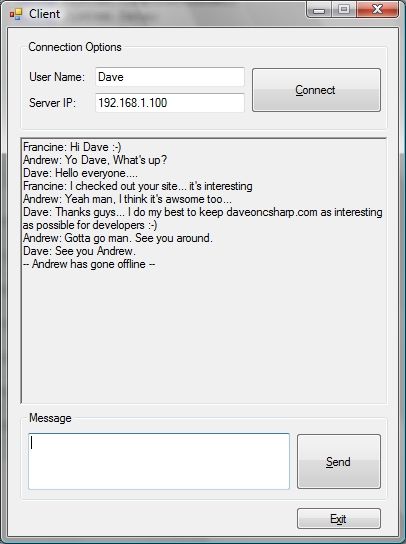
As can be seen in the above screenshot, there is a section where the user must input a user name and a server IP address. Once this is done the user must click the connect button to let the server know that a client is connecting. The connect code is shown below:
private void btnConnect_Click(object sender, EventArgs e)
{
    try
    {
        this.name = txtName.Text.Trim();

        // Initialise a packet object to store the data to be sent
        Packet sendData = new Packet();
        sendData.ChatName = this.name;
        sendData.ChatMessage = null;
        sendData.ChatDataIdentifier = DataIdentifier.LogIn;

        // Initialise socket
        this.clientSocket = new Socket(AddressFamily.InterNetwork, SocketType.Dgram, ProtocolType.Udp);

        // Initialise server IP
        IPAddress serverIP = IPAddress.Parse(txtServerIP.Text);

        // Initialise the IPEndPoint for the server and use port 30000
        IPEndPoint server = new IPEndPoint(serverIP, 30000);

        // Initialise the EndPoint for the server
        epServer = (EndPoint)server;

        // Get packet as byte array
        byte[] data = sendData.GetDataStream();

        // Send data to server
        clientSocket.BeginSendTo(data, 0, data.Length, SocketFlags.None, epServer, new AsyncCallback(this.SendData), null);

        // Initialise data stream
        this.dataStream = new byte[1024];

        // Begin listening for broadcasts
        clientSocket.BeginReceiveFrom(this.dataStream, 0, this.dataStream.Length, SocketFlags.None, ref epServer, new AsyncCallback(this.ReceiveData), null);
    }
    catch (Exception ex)
    {
        MessageBox.Show("Connection Error: " + ex.Message, "UDP Client", MessageBoxButtons.OK, MessageBoxIcon.Error);
    }
}
In the above code, the first thing we are doing is creating a Packet object and setting the data identifier to LogIn. When this packet is sent it will let the server know that a client wants to join the chat room. Next we are initialising the server and socket details and then the Packet is converted into a byte array and sent to the server. Finally the client starts listening for any broadcasts from the server and when it receives something the received data is processed with the below code:
private void ReceiveData(IAsyncResult ar)
{
    try
    {
        // Receive all data
        this.clientSocket.EndReceive(ar);

        // Initialise a packet object to store the received data
        Packet receivedData = new Packet(this.dataStream);

        // Update display through a delegate
        if (receivedData.ChatMessage != null)
            this.Invoke(this.displayMessageDelegate, new object[] { receivedData.ChatMessage });

        // Reset data stream
        this.dataStream = new byte[1024];

        // Continue listening for broadcasts
        clientSocket.BeginReceiveFrom(this.dataStream, 0, this.dataStream.Length, SocketFlags.None, ref epServer, new AsyncCallback(this.ReceiveData), null);
    }
    catch (ObjectDisposedException)
    {}
    catch (Exception ex)
    {
        MessageBox.Show("Receive Data: " + ex.Message, "UDP Client", MessageBoxButtons.OK, MessageBoxIcon.Error);
    }
}
The above code is very simple. Since the client can only receive a Message from the server there is no need to process the data identifier which is at the beginning of the packet. Obviously, if you want your code to be robust and capable of handling any type of exception, you should check the data identifier… just in case.
All the code in this article can be made more robust. For example, there is no check to validate the IP address entered by the user in the client UI. There are no limits to the lengths of the input fields in the UI. There is no verification that the whole packet has in fact arrived in tact and uncorrupted. I think you get the picture… there is never a limit to the amount of checks you can perform and every good developer adds at least some of these checks to make the application more robust.
Conclusion
As you can see creating a client-server chat application using UDP is not that difficult. Obviously, there are many improvements you could make to this application. For example:
- assign a different colour to different users so as to easily identify them apart,
- allow sending of files (this would require a change to the custom data packet, and it would be better to use TCP instead of UDP for sending files,
- display a list of all connected users on every client UI,
- convert the server into a Windows Service to avoid starting it up manually,
- add support for emotions,
- implement a system to differentiate between users with the same name,
- etc.
I really hope you enjoyed this article. Please leave your comments below and don’t forget to download the whole code listing from below – it requires Microsoft Visual Studio 2008.
Also, if you haven’t already subscribed to my rss feed, please do so – Grab RSS Feed. And if you like you can also follow me on Twitter.
Dave
 Download Chat Client source – 15.0 KB
Download Chat Server source – 14.8 KB
Hey thanks a lot…
It was helpfull:-)
Thanks for your comment. Glad you found it useful.
Dear Dave,
First of all, your program is perfect. The code is simple and easily understood.
I tried using my local IP; mean in my LAN, and I tried the program…It worked.
How about the world wide IP address? (I dont know if that is what they call it, but you know what I mean 🙂 )… I tried using it .. that didnt work …
Is your program intended to work in this case? or there is another way of doing it??
Thanks a lot 🙂
Hi Omar,
I’m glad you found the code easy to follow and understand.
The program should work over the Internet, but it must be behind a public fixed IP address. However, I have not tested this, but in theory it should work.
Dave
Thanks Dave …
After reading your reply, I think the problem is i am using a USB modem 😀 … It takes a variable IP (which worked in the application) , so maybe it takes the place of the public IP
Therefore I am wondering if there is a function we can use to find out the IP my computer is currently utilizing to connect to the world over the internet
As far as I know there is no method to get the external IP address, especially if you are behind a router. You would have to rely on external services to give you your external IP. Many people choose to parse the html content returned from a site like http://www.whatismyip.com and get the IP from there, but personally I don’t really like that technique. Having said that I don’t know of a better way. Let us know if you find a way 🙂
You are right about the router issue … but I have another question..
can we use this program to send an image? …
I can see that before you send a packet, you convert everything using ‘BitConverter’ … If something similar can be used to send images, it would be great 🙂
You can send whatever you want over sockets – it’s binary data. To send an image, or any other file for that matter, you would do something like this:
To send the file:
// Create stream to load file FileStream fs = new FileStream(file, FileMode.Open, FileAccess.Read); // Go to beginning of file fs.Position = 0; // Setup temporary buffer byte[] tmpBuf = new byte[1024 * 1024]; while (fs.Position < fs.Length) { // Loop until we reach the end of file int len = fs.Read(tmpBuf, 0, tmpBuf.Length); // Write file to stream dataStream.Write(tmpBuf, 0, len); } // Clean up fs.Close(); To receive the file:fileStream = new FileStream(file, FileMode.Append); readLenth = 0; while ((readLenth < dataSize) && !exitLoop) { // Read data from socket bytesReceived = socket.Receive(dataBuffer, 0, dataBuffer.Length, SocketFlags.None); // Exit loop if nothing was received if (bytesReceived == 0) { exitLoop = true; break; } readLenth += bytesReceived; // Write received data to filestream fileStream.Write(dataBuffer, 0, bytesReceived); } // Close filestream socketData.FileStream.Close();Hope that helps 🙂
Thanks again Dave … I will try this method later, but there is something more important I would like to ask about …
I have noticed that an error occurs on sending a large array of bytes … I mean a VERY large array … something that reaches multiple kilobytes … I dont what exactly limits the buffer size …
So, is there a method to send this large array by adjusting the original chat program code instead of the one you sent last time? (I was able to adjust the original code, but I am still limited by the allowed buffer size) …
Sorry for my continuous questions 🙂
Excellent work mate, exactly what I was looking for. Although, I know nothing about udp packets.
Would you mind giving me an insight on how to send a list of all the users currently connected to the clients? I tried but failed.
Hi Jayden. Thanks for your comments.
Why did you fail – what have you tried so far?
Hi Dave, thanks for your reply mate.
I failed at trying to add a new section to the packet, which sends the names to the client :\
Yo… Thanks you so much …because of you, I can refer your program and modify into what I need.
If possible, can I discuss with you for program? via mail?
Hey, I’m trying to get this to work as a WPF app, got the chat server up and running as a WPF app, now when I try to convert the client to WPF and run it, it connects to the server and the server receives the connection from the client, but I get an error that Receive Data:Vallue cannot be null. Parameter name method.
I don’t understand the error, I mean it’s the same code as on your windows forms application, why is this exception in the ReceiveData method being thrown?
Any clue would be awsome…
I am new in C# and I have some diffucults.
I want to send and receive image, but I don’t know how to use the code of image receive ,if you can Dave please write here the class ,where you use image receive method.
Here is one C# TCP chat program
http://csharp.net-informations.com/communications/csharp-chat-server-programming.htm
vayn.
Hi…Dave
I need your help,
Can you guide me to build Webcam Streaming Client-Server over internet in C# windows form?
I hope you can
Thanks in advance
thank u soooooooooooooooooooooooooooo much
i try it now ^_*
Hi, the article helped me a lot!
But I need to send a message to all connected clients without function ‘Receive’, just a ‘Sent’ function.
How can I send a message to all clients via a button?
Nice app
// Create stream to load file
FileStream fs = new FileStream(file, FileMode.Open, FileAccess.Read);
// Go to beginning of file
fs.Position = 0;
// Setup temporary buffer
byte[] tmpBuf = new byte[1024 * 1024];
while (fs.Position < fs.Length)
{
	// Loop until we reach the end of file
	int len = fs.Read(tmpBuf, 0, tmpBuf.Length);
	// Write file to stream
	dataStream.Write(tmpBuf, 0, len);
}
// Clean up
fs.Close();

To receive the file:
fileStream = new FileStream(file, FileMode.Append);
readLenth = 0;
while ((readLenth < dataSize) && !exitLoop)
{
	// Read data from socket
	bytesReceived = socket.Receive(dataBuffer, 0, dataBuffer.Length, SocketFlags.None);
	// Exit loop if nothing was received
	if (bytesReceived == 0)
	{
		exitLoop = true;
		break;
	}
	readLenth += bytesReceived;
	// Write received data to filestream
	fileStream.Write(dataBuffer, 0, bytesReceived);
}
// Close filestream
socketData.FileStream.Close();
Hello Dave, this example and explanation is very good!
I think that those who publish on the website of Microsoft, should learn from this website.
=D
hi, how should I send message to one client not all client?
thanks
Hi Dave, this is an excellent program, but I am having a small problem whose solution must be very easy…. I added a textbox and a send button on the Server Form, and I want to broadcast that textbox contant to all clients. please can you help. very urgent.
Thank you very much for this wonderful code.
Thx dave it was helpfull..
So, can we encrypted while sending chat?
hello sir in this project there is no any error but it does not show conversation and i creat client form and server form different i tried to disable windows firewall but no output plz help me fast
hy
i wanna do private chat with specific user
can you plz help me ??
your code really works, thanks but i have query
if server and client application is running and due to some reason clients pc internet is lost i want the server application to say client is ofline without client application is closed
need it urgently plz do help
I would like to know if I want to send location coordinates from clients to the server . what could be the changes that I have to make. ?